Sunday, 10 March 2024

Swing bowling in Cricket

For all types of swing:

  • The plane of the seam must be vertical with respect to the ground - known as upright seam.
  • Backspin must be imparted to the ball so that the seam stays upright and the ball doesn't wobble - this is done with a flick of the wrist at the moment of delivery.


Conventional swing


Ball swings in the direction that the seam points to:
  • Outswing: deliver the ball with the seam pointing to the second slip.
  • Inswing: deliver the ball with the seam pointing to leg slip.

The side that has relatively more shine should face the batsman.

The side that has deeper embossing must be allowed to become rough and dry (the deeper embossing adds to the roughness). The other side of the ball should be frequently polished to retain the shine as much as possible. 


Reverse swing


One side of the ball must be very rough and dry, and the other must be shiny. Usually it takes 20-40 overs to get the desired level of roughness.

The seam must not be bashed in.

The leading, rough side of the ball must face the batsman.

The ball moves in a direction away from the seam i.e. if seam is pointed towards slips and the rough side faces the batsman, the ball swings into a right-handed batsman.

Interestingly, express fast bowlers may produce reverse swing even with the new ball. The extreme pace (>145kmph) produces the same reverse effect as the roughness in the ball's surface.


Contrast swing


The ball must be held "seam up" i.e. the seam should be vertical and point straight ahead (and not be angled towards the second slip or the leg slip).

One side of the ball must be rough and the other side shiny.

It does not matter if the seam is bashed in.

The speed of the ball determines which way it will swing. For a medium pace bowler, the ball would swing towards the rough side whereas for a faster bowler, it would swing towards the shiny side (you can see how the speed can be varied by a faster bowler to achieve swing both ways).

In street/gully cricket in the sub-continent, contrast swing is achieved by taping one side of a tennis ball. The ball is delivered with the taped side on the left or right.

Sunday, 4 February 2024

Cervical cancer can be prevented

Cervical cancer is dangerous


It was the second most common type of cancer among women in India in 2020, with 33,000 deaths per year, 8000 of those in Tamil Nadu. Cervical/Vaginal/Vulval/Anal cancers and genital warts are caused by the virus HPV, and can be prevented through vaccination.


Vaccine


Vaccination is to be done between ages 9 and 26. If your child is young and you can wait, do so since the Govt of India has added vaccination for HPV to India's universal immunisation program and is likely to buy Cervavac in millions of doses. Hence the price may come down from Rs.2000 per dose to around Rs.400 in 2024-25. The vaccine is given in two doses till age 15, and in three doses after that.


HPV infection is like any other infection


Most media and people talk about HPV being spread via sexual contact only because it is the most documented route. However, it can spread through other ways like touch, skin contact, clothes/utensils/furniture etc. So, do not assume a person had sexual contact if they are infected by HPV. It is suggested to get this vaccination early only because HPV can be transmitted easily via sexual contact (it could even be contracted from someone who got it via a non-sexual route).

HPV infection is neither detectable nor curable, but can be prevented by vaccination. People generally get to know they are infected when they are diagnosed with cancer or if they get genital warts. A genital wart does not lead to cancer by itself - it can be removed/treated.

Please consult a Doctor and do not act by yourself regarding anything discussed above.

Friday, 16 June 2023

Playing Chess helps prisoners

"The reason why people are in prisons is because they didn't think before they made a move. In chess you have to think before you move."

Charities and chess orgs in India, UK and US are teaching prisoners to play chess.

"Playing chess is part of normal life. So playing chess in prison can make you feel like you're normal, and not a criminal.", says an inmate.

Last year there was a FIDE online tournament for prisoners. In the selection tournament in India, twenty teams from prisons all over India participated, from which two teams were selected to represent India.

The team from the Pune prison in India won the bronze medal. They were coached by Indian GMs who work for Indian Oil Corporation, which organizes sports programs in Indian prisons.


Android phone contacts deleted - how to restore

If the contacts on your Android phone got deleted by accident, or if you don't know how it happened, do the following to get back your contacts.

If the contacts are present in the Bin, just restore them.

If they are not present in the Bin, you can still restore them, if they are being synced, or if the phone is being backed up regularly.


If your contacts had sync turned on


Disable sync of Contacts so that it doesn't interfere with the restore process.
Go to Settings -> Accounts -> your Google account -> Account Sync.
Turn off sync of Contacts.

  • Go to the site to which your contacts are getting backed up - if you use the Google Contacts app, this would be contacts.google.com .
  • If any of your contacts are missing, select the "Undo changes" option under Settings. Select a point in time when you are sure all your contacts were present.
  • Click through and come out of the dialog screen.
  • Wait for a few seconds till all contacts are restored.

Clear the cache of your Contacts app.
Turn on sync of Contacts.

If the contacts don't show up on WhatsApp or any other app that use your contacts, exit that app, clear their cache and open the app again.


Restoring contacts from phone backup


Go to Settings -> Google -> Set up and Restore -> Restore contacts
Go through the rest of the process.

If the above doesn't work and sync of Contacts is turned on, turn it off. Clear the cache of the Contacts app and try once more.

Tuesday, 26 May 2020

Best computer/device/setup for online classes for school students

Raspberry Pi (Model 4B) is a good choice for a computer/device for school students attending classes online.

The Pi 4B is like a computer's motherboard, so resellers and others bundle it with the following essential items, making it a complete kit (for around Rs.6500):
  • Power adapter
  • 32GB SD memory card
  • Case - with fan
  • Network patch cable
  • MicroHDMI to HDMI cable
Other items needed:
  • TV or a computer monitor (new monitor might cost around Rs.5000).
  • Wired earphones with mic (around Rs.500 to Rs.1000).
  • Wired Keyboard and mouse are needed for setup (around Rs.1000). If you wish, get a wireless keyboard and mouse when it is time to get new ones.
  • If you have an inverter at home, there is no need to buy a new UPS (Rs.3000). Plug in the Pi into a socket that gets power from the inverter.

Availability of products on Linux


The official Operating System (OS) Raspbian, and other OSs, can be installed on the Pi. In certain cases, companies do not distribute their products for Linux. So, before you settle on Pi, list the products that you consider essential and ensure those are available for the Pi. At times, instead of a native product, they may have a version of the product that can run on the browser - check if the browser version has all features you need.

Cost and maintenance


Total cost would in the range of Rs.8500 to  Rs.16000, depending on what you have at home already.

Amazon Fire Stick is also an economic option and needs to be tested. The keyboard, mouse and headset (with mic) would have to be connected via Bluetooth since newer versions of the Fire Stick don't have a USB port. If required apps are not available on the Amazon app store, one has to sideload Google Play Store and then install required apps or straightaway try Apps2Fire. Cost: Rs.4000 + another Rs.3000-3500 for accessories. TV may not be in a private place, which could be a disadvantage.

Other alternatives in this price range, like Samsung 10" Tab and Chromebook, cost a bit more to buy and maintain. They cannot be upgraded when the time comes and have to be replaced. However, they have a wider selection of apps (though, Android updates are provided only for 1.5 to 2 years). The Samsung Tab obviously has a touch interface - consider if it could be an advantage for any of your apps. Chromebook is an integrated product and gets OS updates for eight years.

On the other hand, the Pi can be upgraded by buying just a new Pi board - the other items need not be bought again.

Thursday, 9 April 2020

Adding a Google account to your Android phone

Let’s say you have an Android phone in which you already have a Google account, possibly your main Google account. If the data from the new account (e.g. Contacts), must not get mixed up with data in your current account (your existing Contacts), the following should help:

Keep the data/wifi connection turned on throughout. We will control this setting using the Airplane mode.
  • Turn off Sync in Settings -> Users and accounts - the general one that applies to all accounts.
  • Add a Google account (you need an internet connection to do this)
  • Turn on Airplane mode (now internet connection is off)
  • Turn on Sync in Settings -> Users and accounts (only then will the sync controls of apps of the new account would be available for you to turn on/off).
  • Turn off sync for most apps - you may want to turn it on only for a few apps e.g. gmail, in case you need to know when you get email for the account being added.
    • Note that Airplane is still turned on so since we don’t want data to get downloaded in the few seconds between creating the account and disabling sync.
    • Google Drive: if sync is turned on, all your files will get downloaded.
  • Turn off airplane mode.
  • Verify if the apps of the new account, e.g. gmail, which have sync turned on, work as expected.

Wednesday, 13 September 2017

Does Google Backup and Sync replace Google Drive and Photos?

Yes, you don't need Google Drive and Photos on your computer anymore. However, my suggestion would be to continue using both these products till Google Backup and Sync (B&S) is rid of a sync related bug, or till support is withdrawn (no more updates after Dec 11, 2017; blocked after Mar, 2018). The bug results in repeated attempts at synchronizing local folders with Google Photos.

If you would still like to install it, go to Settings in Google Photos and note folders that are being synchronized with the Google Photos site. Then, uninstall Photos and install B&S. Google Drive would be uninstalled automatically. You'll be asked to restart the machine.

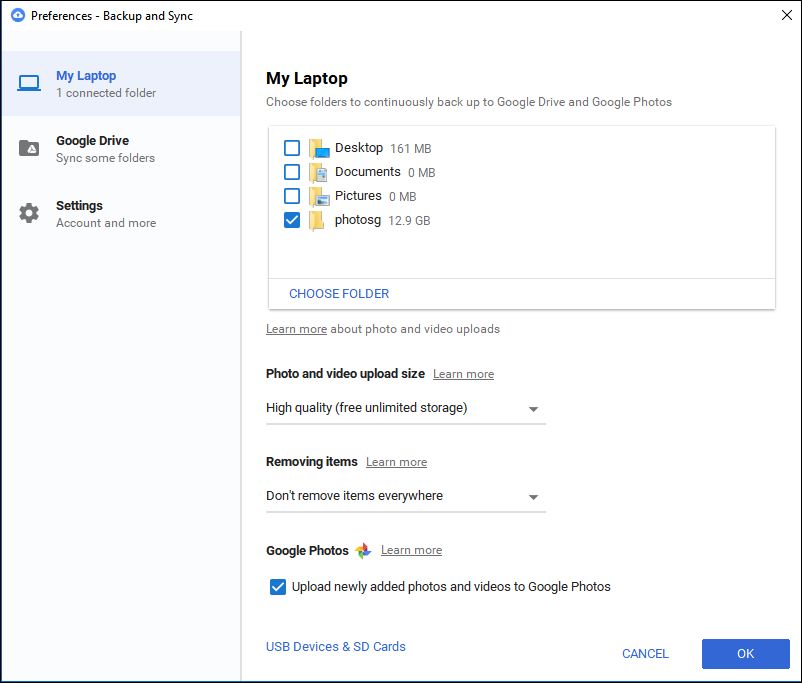
After the restart, open B&S from the tray and select Preferences from the menu which would display the following screen:

Google Backup and Sync: Preferences screen

Set the options for Size and Removing Items as shown above. The setting shown will preserve your photo on the Google Photos website even if you delete it from your hard drive (this was how the old Google Photos app worked). Conversely, this setting does not sync your Drive if you delete a file locally (this behaviour is different from the earlier Drive app; if this option is important for you, please see the comments in this blog post; in short, there is no other way till Google B&S is updated).

Then, select Choose Folder and add the folders that must be synced with Google Photos (which you have noted down). This won't duplicate photos if the folder has already been uploaded by Google Photos. However, B&S would again go through the folder contents and compare it with what's present in the Google Photos site to ensure all is well.

Certain file types may not have been uploaded by Google Photos e.g. TIF, THM. However, B&S uploads files of these types too. Thumbnail related files like thumbs.db and zbthumbnail.info would also be uploaded by B&S. As of now, there is no setting for what files must be synced.

Select the checkbox labeled "Upload newly added photos" if you would like to keep the folders synchronized with the Google Photos site in future.

Saturday, 15 April 2017

Google Photos - deleting photos

What happens when you delete a photo

  • If you delete a photo from the web (photos.google.com), the photo is deleted from the site and from all your devices. The photo can restored, if you want to, within 60 days - from the menu, select Settings -> Bin, select photos and restore.
  • If you delete a photo in the Google Photos app on your mobile, the result is the same as above - it would be deleted from all your devices and from photos.google.com
  • If you free up space in the Google Photos app, photos and video are deleted only from your device.

Disable Backup & Sync temporarily

When you are about to shoot photos/video and may not retain all photos and video from the shoot, you may temporarily disable backup & sync and then enable it again after deleting the unwanted ones (this would prevent items that are eventually deleted from getting backed up unnecessarily).

This option is available here: Google Photos app -> Settings -> Backup & Sync -> toggle off Backup and Sync.

Note that this disables Backup & sync of all Google apps, so it's a bit inconvenient if you plan to delete photos the next day but would like other Google apps like Drive to sync data between devices.

Monday, 3 April 2017

Gallows Humour (Tamil)

உயிர் பிரியும் நிலையில் கேட்டார் கோடீஸ்வரன், “ஏன்டா என் tweet-a பாக்கல? கொஞ்சம் முன்னாடி வந்திருந்தா நான் பொழச்சிருப்பேன்ல?”. மகன் கலங்கிட்டான், “உடனே Retweet பண்ணிட்டேன், ஒருத்தன் கூடவா வரல?”.

---

கோடீஸ்வரன் காலமானார். Twitter-ல் செய்தி பரவியது. தாமதமாக வந்த உறவினர் வருத்தப்பட்டார், “நான் WhatsApp-ல active-a இருக்கேன்”.

---

கோடீஸ்வரனுக்கு வாய்க்கரிசி. கடைக்காரர் சொன்னார், “பாவம், எப்பவும் organic item தான் வாங்குவாரு”.

---

கோடீஸ்வரன் அஸ்தியை வாங்கப்போனான் மகன், "அவர் கால்ல டைடானியம் தகடு இருந்ததே?"  சட்டியுடன் தகடை நீட்டிய வெட்டியான் சொன்னார், ”இது வெந்த காயம், மத்த ரெண்டும் வெங்காயம்”.

Friday, 10 March 2017

Laptop - ergonomics - home setup

Once the points made in the picture below are understood, it would be easier to arrive at a setup that works for you.

laptop-ergonomics.png
Good posture


Chair and writing pad

  • If you have a comfortable chair or sofa with armrests, check if it is possible to place a wide writing pad across the armrests. The must extend beyond the armrests on the front and sides.
  • Buy a pad that can support the weight of a laptop - plywood or cardboard writing pads with 0.5cm thickness are enough.
  • Place the laptop on the pad and check if you can work comfortably (check if the feet, elbow, back and head are as given in the above picture).
  • It must be stable enough to survive minor knocks that are inevitable.

Chair and table


Check if you already have a chair and table that fit the requirements. Otherwise, buy suitable ones.
  • Buy a basic computer table with a pullout tray on which a mouse can be placed alongside the keyboard.
  • Buy a chair that has height adjustment. If the room does not have temperature control, the chair's seat and backrest must allow circulation of air e.g. chairs woven with flat wire, wooden chairs with slits.
  • Place the laptop on a few thick books. Or, buy a stand for the laptop - with the stand’s height in mind.
  • Connect an external keyboard and a mouse to the laptop (USB port).

External monitor


Here's how to use an external monitor if your work demands one.
  • Connect the monitor to the laptop via HDMI.
  • If the monitor does not have speakers, sound has to be played via the laptop’s speakers or external speakers (select the device for sound output in the Operating System’s control panel). If you still have a problem, search the internet for a simple solution.
  • Power settings may need to be changed so that laptop continues to be switched on when its lid is closed.

Monday, 6 March 2017

Kohli lbw b Hazlewood - did DRS get it wrong?

Australia vs India, Day 3 of Test Match #2.

The match is at a critical situation. The series is in balance.

Hazlewood to Kohli. The ball is on target but keeps low and Hazlewood appeals for lbw. The on-field umpire rules Kohli out - he must have thought either Kohli didn't hit the ball or that he hit it after the ball had struck the pad.


Kohli thinks it was the bat that hit the ball first and asks for a review.

The Third umpire confirms bat hit the ball, but is not sure whether it hit the ball first. So, as the DRS rules prescribe, he says the replays are "inconclusive". He leaves the decision to the on-field umpire.

DRS rules 3.3 (k) and (l) say what must be done next: "The on-field umpire must then make his decision based on those factual questions that were answered by the third umpire, any other factual information offered by the third umpire and his recollection and opinion of the original incident. The on-field umpire will reverse his decision if the nature of the supplementary information received from the third umpire leads him to conclude that his original decision was incorrect."

Returning to the match situation, the on-field umpire now knows that even the third umpire, who has access to UltraEdge and slow-motion replays from many angles, is unable to conclude whether the batsman is out or not. How then could he be sure about his original decision? When the umpire is in doubt, he cannot rule a batsman out. But he sticks to his original decision and sends Kohli on his way. Rarely does an umpire reverse his decision. What does this tell us?

Sunday, 5 March 2017

Cricket and DRS

I was at the beach. Two guys came and settled down nearby with a pack of masala groundnuts. One of them seemed upset at how things had turned out for India in the cricket Test match against Australia. The other guy had a know-all look about him.

Small time player: Do we really need DRS?
Officer: Why not, we have the technology. On-field umpires need all the help they can get.

DRS - review in progress


P: Then why doesn't the umpire himself consult the third umpire for LBW etc.?
O: He isn't allowed to, except for a few decisions e.g. run out, clean catch etc.

P: He is responsible for his decision, isn't he?
O: hmmm...

P: Why should the team be docked for the umpire's decision... I mean reducing the number of reviews if their appeal for review is turned down.
O: Because you can't repeatedly question the umpire's decision... time is wasted and you know time is money.

P: Isn't DRS about getting better decisions?
O: Of course, that's why they spend around US$100,000 on it for a Test match.

P: How many credible appeals are made in 80 overs, or in a day, roughly?
O: I don't know... could be 20-30 on a wicket that produces a result.

P: And a team gets only two chances if the two reviews are unsuccessful?
O: Yes, the teams have to get their decisions right.

P: Isn't that why we have umpires?
O: hmmm...

P: I think you should let the umpires get help from the DRS umpire on their own. To limit the time taken, you could give the umpires and the teams one review every 10 overs.
O: Sure, I'll inform ICC if they ask me.

Officer had emptied the groundnuts and got up for a refill.

Monday, 30 January 2017

Ballpoint pens are are not recycled, use pens that can be refilled with ink

Throwaway ballpoint pens pose a serious environment problem. Billions are used and thrown away every year. These pens, and refills, are not recycled since it is difficult to separate the metal nib and ink from the plastic.

It isn't a secret that the ballpoint pen is the most popular type of pen. It uses a thick, oil-based ink that is dissolved in alcohol. As soon as you write, the alcohol evaporates, and so the ink dries up quickly. The ink does not bleed through paper and lasts long. But since the ink is thicker, the pen must be pressed harder on paper leading to greater stress on the hand and slower writing.

Fountain Pen


An environment-friendly alternative to ballpoint pen is the fountain pen - it is commonly available too. Some kids may find it difficult to write with the traditional nib since its angle with the paper must remain the same to ensure smooth writing. To get around this, use fountain pens that have roller balls at the tip instead of nibs. (Ballpoint pens too use roller balls; however, the ink used by roller ball  pens is thinner and so the flow is better.)

Fountain pen with nib (Wikipedia)
Roller ball pens use either water-based ink or a thicker gel ink (pigments on a water-based gel). Gel ink dries quicker. It also writes thicker but may skip/slip occasionally and bleed more.

Close-up shot of roller ball at the tip
(Wikipedia)
Some pens use removable cartridges that hold ink - the advantage is that students can carry a spare cartridge to school instead of an ink pot. When the cartridge in the pen runs out of ink, it can be replaced with the spare one. The empty cartridge can be refilled later at home. Throwing away a cartridge after using it once defeats the purpose of using refillable ink pens. (Also, don't buy pens with cartridges that cannot be refilled.)

If you travel by air with a fountain pen, the guaranteed way to prevent leakage is to empty the ink tank. Or, fill it up and keep it upright.  To use the pen, wait till the flight takes off and reaches 6000 feet, which is when cabin pressure is increased to match the pressure at ground level (the air trapped in the ink tank is at the pressure at ground level; if the pen is opened before the cabin is pressurized, the higher pressure of air in the tank will push out the ink since the pressure in the cabin would be lesser).

Saturday, 6 February 2016

Spectacles: plastic lens or polycarbonate lens?

Specs
When shopping for a pair of spectacles, people are not usually not aware of lens materials and may be baffled by the sales pitch and the options available at the store.

Optical quality is the most important point to consider when buying spectacles. Glass has the best optical quality, followed by plastic lens and polycarbonate lens. However, glass is not commonly sold by retailers since it breaks easily and is heavier if the power is higher e.g. more than +2 dioptres.

When CR39 was the only type of plastic lens available, polycarbonate had a couple of advantages. But with the advent of plastic lens like MR8, MR174 etc., polycarbonate is not required for low, mid or high power.

In a nutshell,
  • Plastic lens has better optical quality.
  • Plastic lens is strong and can be cracked or broken only with great force.
    • CR39 plastic lens is good enough for most people.
    • If the lens must be stronger than CR39, consider MR8 - it is as strong as polycarbonate.
  • Polycarbonate lens is sold at a premium, which is why stores recommend it over CR39 for low power.

Buying spectacle lens

The following indication is general and simple, there are a few variables to consider. Armed with the details here and some research based on your prescription, you would be able to handle well the conversation with your optician.
  • Lower power/index: 
    • Get CR39 plastic lens (or any alternative entry-level plastic lens) 
    • Get Ultraviolet and anti-reflective coating applied. 
    • Make the lens photochromic, if required. 
  • Higher power/index lens, high impact sports: 
    • Get stronger plastic lens like MR8. 
  • Frame: 
    • For half-rim frame, CR39 is fine (recommended) 
    • For rimless frame, get MR8 plastic lens since CR39 lens will crack when screws are drilled. 
  • Bifocals: 
    • The type with Line in the middle where bottom half is for reading. Especially useful if the glass is only for reading. May avoid tilting up head when reading. Check if this type of lens obstructs long distance (non-reading) vision.
    • If the above type obstructs your long distance vision, go for D-shape or circular portion (Kryptok) at the bottom of lens.
  • Special cases: 
    • Please consult an expert in optics. The MR series has other types of lens.

Sunday, 31 January 2016

Library Management Systems - free software

This is a brief overview of free Library Management Systems (LMS) that educational and other institutions can make use of.

Some of the free ones are open source software (OSS), meaning their code too is available for modification and use.

Main features of an LMS


  • Acquisitions (buy books etc.)
  • Cataloguing (classify and index books etc.)
  • Circulation (lend and receive)
  • Serials (track periodicals like magazines)
  • Online Public Access Catalog or OPAC (online access for library members)


LMS - products


The software listed below have been selected from the many that are available. Products were left out for reasons like: they were not being actively developed or did not have strong backing of a community or organizations, have outdated technology and are not suitable for use etc.

DIY or find a service provider


The software may be installed on your own server or on cloud. This would be cheaper - however, depending on your choice, it needs ongoing maintenance of software and hardware (apply software updates, fix security issues, upgrade hardware etc.). This option can be considered if you have a couple of people in your organization who are familiar with the relevant technology and can handle ongoing maintenance.

Alternatively, there are (third-party) service providers who take care of the software and hardware, maintenance etc. While the cost for this option would be higher, it is useful if you do not have people with technical knowledge, or if you need to save their time. The main thing here would be to find a good, reliable service provider. A trial period would help you to check out their service. Talking to an existing customer would help.

Table for comparison of LMS products


To start with, it would be a good idea to list your requirements at a high level. Then, use a table, with columns like those below, to compare the available software systems.

  • Product (linked to home page)
  • Target (targeted for specific types of libraries? e.g. K12, scientific etc.)
  • Unique features
  • Standards for communication: MARC, Z39:5. Modern alternatives to these.
  • Authentication standards: LDAP
  • Interfaces for staff, members: browser-based software is better
  • Offline usage (when connectivity to LMS server is not available)
  • Number of Installations, worldwide and specifically in your country.
  • Contributors: community or company. Is community active and dedicated?
  • Operating Systems supported: Hosting on Linux may cost less. Mention if software package has to be built by ourselves.
  • Hosting service providers: cost, extent of technical support, whether they offer help in initial setup, backup and restore procedures, support hours, on-premise support etc.
  • Total cost to institution
  • Year it began: product might be more stable, but check if technology is outdated and hampers usage.
  • Technology stack: to evaluate if your organization has in-house expertise, is the stack outdated and hampers usage or finding expertise.

Usage in India


Koha seems to be popular choice in India. (LibSys, a commercial LMS, is also popular in India.)

Thursday, 28 January 2016

The Great Indian Hedge

Between 1803 and 1879, the British divided India by building a Customs line (hedge) that was 4000 kilometres long. In 1998, remnants of the forgotten hedge were discovered by Roy Moxham, a British writer, who went on to write a book about it.


The Great Indian Hedge
(photo: wikipedia)
The Great Indian Hedge was initially a set of Customs houses along a road. Then dead thorny material was added to the area in between - later this became a living hedge of thorny trees, bushes and shrubs that was difficult to penetrate.

It had toll gates in order to levy tax on salt and sugar that were transported from the western part of India to the east. During the years the system was in place, millions of people died in the east (Bengal) due to starvation, cholera and lack of salt though ample salt and food were available across the hedge in western India.

Even as people were dying during famines, the East India Company transported much needed salt and food on trains to shipyards in the south, to be exported to other parts of the British Empire.

In 1879, when maintaining the hedge became difficult, the British began controlling production of salt at the source and kept the tax going.

A prominent Congress leader, S.A.Swaminatha Iyer, raised the issue of high tax on salt in the first session of the Indian National Congress, held in Bombay in 1885. Subsequently many others took it up, culminating in Mahatma Gandhi's historic Dandi March in 1930.

However, the British defied massive protests and continued the tax. It was only abolished in 1947 by the Interim Indian Government headed by Jawaharlal Nehru.


A sea of men and women marches towards Dandi, 
peaceful in the face of police brutality.


For more details, see:

Thursday, 21 January 2016

Moto G2 camera error: "restart camera", or "unable to connect to camera"

When you launch the Motorola Camera app on a Moto G2, and it says "Restart camera" or "Unable to connect to camera", try the following:

  • Go to Settings->Apps
  • Select the Camera app that has the problem
  • Force stop it
  • Clear its cache and data
  • Restart Camera

If the above did not solve the problem, try the following. Stop when the issue gets fixed:

  • Switch off the phone. Gently press the area around the lens and restart the phone.
  • Think of any recent change made to the Camera app or any other app that interacts with the Camera e.g. Google Photos. Undo the change. (To see apps in order of installation date: go to Play Store->My Apps->All.)
  • If the Camera app was updated recently: uninstall updates to the Camera app and launch it again. If it works, re-install updates and check again.
  • If you have Google Photos or a similar app that interacts with your camera, go to its Settings and modify any option that relates to the Camera e.g. checkbox that lets you add a link to Photos in Camera. Save changes. Restore the setting if you prefer. Check Camera now.
  • Start Android in Safe Mode and check if the Camera app works. If it does, start third-party apps one by one and check if the Camera works after each step.
  • Uninstall updates to the Camera app and launch it again. If it works, re-install updates and check again.
  • Go to Settings->Storage. Select "Cached data" and select OK to clear the cache of all apps.
  • Visit a service centre as it could be a hardware problem.

Friday, 20 November 2015

Experience Virtual Reality (VR) with Google Cardboard (India)

Google Cardboard is an inexpensive intro to Virtual Reality(VR). See this video to get an idea of what it is.

The design/specification for the headset was released by Google sometime ago - while you can build your own headset based on the design, you can also buy one from a third-party manufacturer.

All it takes is:

  • A compatible mobile e.g. Moto G2
  • An inexpensive headset that is based on Google Cardboard's design and
  • The Google Cardboard app and other games, experiences


Compatible mobile


  • Maximum display size of 5.5"
  • HD display is good, 720 is ok
  • Gyroscope (check if yours has one by using an Android app like Sensor Kinetics)
  • Magnetometer desirable, not compulsory (this works with a button at the side; this is the only input mechanism)
  • In my experience, Moto G2 is a compatible mobile.

Buying the headset


  • The plastic one named AuraVR is sturdy, but the locking mechanism is fragile.
  • Irusu is a cardboard set with PVC coating and may last longer.


Apps


  • Install the Google Cardboard app - this is like a controller for other apps that you actually view or play with. 
  • Then, install a game like Lamper VR or view YouTube360 video clips.


Mattel View-Master


In the US, a good quality viewer is available - Mattel View-Master. You can buy the viewer and also the apps that Mattel sells, or choose to just get their viewer and use free apps. The viewer doesn't have a head strap though - it needs to be held with both hands which some may feel diminishes the experience.


Google Cardboard 2.0


Google Cardboard is currently at version 2.0 - the original one was 1.0. Here's what's new in 2.0:

  • Support for mobiles with a display size of 6"
  • Push button that taps the mobile's screen
  • Larger lens
The above links to headsets are for the 1.0 version, however the experience is good enough. As of now, headsets for 2.0 are hard to find in India.

Thursday, 24 September 2015

How to help students learn and remember

Like many people, I am interested in how we learn and had these questions:
  • How to help students learn concepts, apart from facts and problem-solving?
  • How to help students remember what they have learnt?


Understand concepts in every classroom session


Eric Mazur, a professor at Harvard, found his lectures to be ineffective and devised a system for students to understand concepts. Though he applied his method to Physics classes, it may be modified to suit other subjects. After the system was used for ten years in various universities, it was modified based on feedback.

Watch Prof. Mazur explain his method (full videoabridged), or read his original article and the modified one. For convenience, I have summarized his argument and method below:

  • Lecturing adds value only if the teacher is exceptional in engaging students - even a talented and experienced professor like Mazur could not cut it with just conventional lectures which is why he came up with the system.
  • Students pass exams with rote learning and by memorizing problem solving techniques without understanding concepts well. Conversely, understanding concepts leads to better problem solving capability.
  • In his method, the teacher no longer covers the entire lecture material in the class. Rather, the teacher explains a key concept and conducts a concept test.
    • If most students answer correctly, he explains the answer and then goes on to the next concept.
    • If a significant number of students haven't understood, he repeats the lecture at a slower pace, and conducts the concept test again.
  • Students read lecture notes before class, and work out problems after class.
  • The system could be adapted for lower classes to reduce/eliminate work done outside class.

Techniques used in the system


Spaced repetition: read this post which describes it and has links to related material. For effective use of spaced repetition, a semester must have at least one, or possibly two, mid-term tests. Otherwise, the student would have forgotten the first few lessons at the time of the final semester exams.

Another important aspect of the system is the immediate feedback that the student gets. Read this inspiring story of how good training and timely feedback helped kids from a humble background to win chess tournaments in the US.

In India, similar techniques have been used through the ages - in education, in the teaching of fine arts, Yoga etc.

Other learning techniques


Teachers could assign projects that test understanding of concepts (parents may help as long as children learn).

At home, students must revisit and recall what was learnt in class (Spaced Repetition again).

Students can also be asked to do the following:

  • Create mind maps.
  • Create learning material using flash cards or software like Anki, which can be used for Spaced Repetition.
  • Explain the subject to oneself or to an imaginary student. Till the student is sure about the topic, it's important to check against the book to know whether the student got it right.

Parents too may use the same principles at home to help children learn and remember. Learning is a vast topic, there's a lot to discuss.

Saturday, 15 August 2015

Android mobile + Chromecast + LED TV

Chromecast is a flash drive sized device that has wifi capability to get data from your network and display it on TV.

It has a USB port for charging and an HDMI port to connect to the TV. It can be controlled by your device (mobile, desktop or laptop) with the help of a Chromecast app. Except in some cases, your device is just a controller and the data is directly pulled by Chromecast via wifi - so if the device is your mobile, its charge is not used up.

Photo courtesy: Google

Not all apps work with Chromecast. However, there are many apps that do - Chrome browser, Youtube and more.

To sum up, this is what you need:

  • Wi-fi network
  • Chromecast
  • LED TV

Scenarios in which Chromecast is helpful:

  • Big screen is required e.g. watching movies, reading a document
  • You have a mobile, have to type more and are not satisfied with the smaller screen.
  • You have a desktop/laptop but need a second, relaxed position to work

For a wireless setup, use a Bluetooth keyboard with touchpad, or see the FAQ on how to use a wired/wireless USB keyboard.

The Chromecast page has a few short videos on how to setup and use Chromecast.

FAQ


* Which versions of Android are supported?
Android 4.4.2 and later. (Android 4.4 is known as KitKat.)

* If I travel, or don't have a wifi modem, what are the options?
Chromecast can be used if there are two devices - both could be yours, or one could be your mobile and the other a hotel wifi router (configured for device to device communication). For example, see this page and this.

* Can I play files present in the device?
Yes. Drag and drop (or open) a file in a tab in the Chrome browser. Or, use an app like BubbleUPnP.

* Can a USB keyboard be used?
Chromecast does not have a provision to connect a keyboard or a mouse. So connect an OTG microUSB-to-USB cable between your mobile and the keyboard (explained in detail here). If you would like to use a wireless keyboard and mouse, connect an OTG cable to your mobile and connect the wireless receiver to the other end of the cable.

* There's not much privacy if I use my TV, can I use an computer monitor?
Yes. It would be unusual for your monitor to have speakers. Which means an adapter is required to separate HDMI to audio and video (VGA, DVI etc.). Get an adapter based on the type of video input that your monitor accepts - HDMI to DVI, DisplayPort or VGA (first two are better).

* Chromecast Help

Popular posts