Wednesday, 13 September 2017

Does Google Backup and Sync replace Google Drive and Photos?

Yes, you don't need Google Drive and Photos on your computer anymore. However, my suggestion would be to continue using both these products till Google Backup and Sync (B&S) is rid of a sync related bug, or till support is withdrawn (no more updates after Dec 11, 2017; blocked after Mar, 2018). The bug results in repeated attempts at synchronizing local folders with Google Photos.

If you would still like to install it, go to Settings in Google Photos and note folders that are being synchronized with the Google Photos site. Then, uninstall Photos and install B&S. Google Drive would be uninstalled automatically. You'll be asked to restart the machine.

After the restart, open B&S from the tray and select Preferences from the menu which would display the following screen:
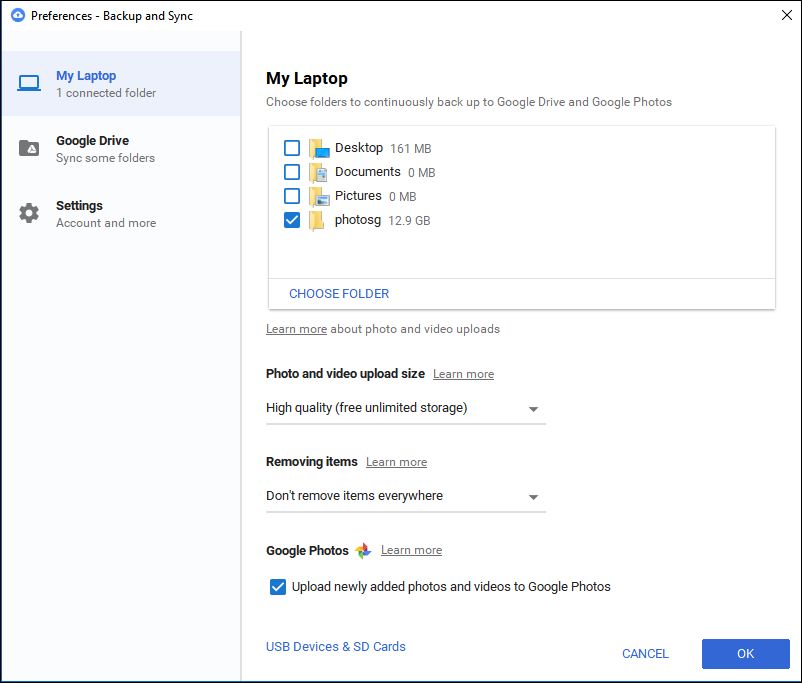
Google Backup and Sync: Preferences screen

Set the options for Size and Removing Items as shown above. The setting shown will preserve your photo on the Google Photos website even if you delete it from your hard drive (this was how the old Google Photos app worked). Conversely, this setting does not sync your Drive if you delete a file locally (this behaviour is different from the earlier Drive app; if this option is important for you, please see the comments in this blog post; in short, there is no other way till Google B&S is updated).

Then, select Choose Folder and add the folders that must be synced with Google Photos (which you have noted down). This won't duplicate photos if the folder has already been uploaded by Google Photos. However, B&S would again go through the folder contents and compare it with what's present in the Google Photos site to ensure all is well.

Certain file types may not have been uploaded by Google Photos e.g. TIF, THM. However, B&S uploads files of these types too. Thumbnail related files like thumbs.db and zbthumbnail.info would also be uploaded by B&S. As of now, there is no setting for what files must be synced.

Select the checkbox labeled "Upload newly added photos" if you would like to keep the folders synchronized with the Google Photos site in future.

Saturday, 15 April 2017

Google Photos - deleting photos

What happens when you delete a photo

  • If you delete a photo from the web (photos.google.com), the photo is deleted from the site and from all your devices. The photo can restored, if you want to, within 60 days - from the menu, select Settings -> Bin, select photos and restore.
  • If you delete a photo in the Google Photos app on your mobile, the result is the same as above - it would be deleted from all your devices and from photos.google.com
  • If you free up space in the Google Photos app, photos and video are deleted only from your device.

Disable Backup & Sync temporarily

When you are about to shoot photos/video and may not retain all photos and video from the shoot, you may temporarily disable backup & sync and then enable it again after deleting the unwanted ones (this would prevent items that are eventually deleted from getting backed up unnecessarily).

This option is available here: Google Photos app -> Settings -> Backup & Sync -> toggle off Backup and Sync.

Note that this disables Backup & sync of all Google apps, so it's a bit inconvenient if you plan to delete photos the next day but would like other Google apps like Drive to sync data between devices.

Monday, 3 April 2017

Gallows Humour (Tamil)

உயிர் பிரியும் நிலையில் கேட்டார் கோடீஸ்வரன், “ஏன்டா என் tweet-a பாக்கல? கொஞ்சம் முன்னாடி வந்திருந்தா நான் பொழச்சிருப்பேன்ல?”. மகன் கலங்கிட்டான், “உடனே Retweet பண்ணிட்டேன், ஒருத்தன் கூடவா வரல?”.

---

கோடீஸ்வரன் காலமானார். Twitter-ல் செய்தி பரவியது. தாமதமாக வந்த உறவினர் வருத்தப்பட்டார், “நான் WhatsApp-ல active-a இருக்கேன்”.

---

கோடீஸ்வரனுக்கு வாய்க்கரிசி. கடைக்காரர் சொன்னார், “பாவம், எப்பவும் organic item தான் வாங்குவாரு”.

---

கோடீஸ்வரன் அஸ்தியை வாங்கப்போனான் மகன், "அவர் கால்ல டைடானியம் தகடு இருந்ததே?"  சட்டியுடன் தகடை நீட்டிய வெட்டியான் சொன்னார், ”இது வெந்த காயம், மத்த ரெண்டும் வெங்காயம்”.

Popular posts