Tuesday, 26 May 2020

Best computer/device/setup for online classes for school students

Raspberry Pi (Model 4B) is a good choice for a computer/device for school students attending classes online.

The Pi 4B is like a computer's motherboard, so resellers and others bundle it with the following essential items, making it a complete kit (for around Rs.6500):
  • Power adapter
  • 32GB SD memory card
  • Case - with fan
  • Network patch cable
  • MicroHDMI to HDMI cable
Other items needed:
  • TV or a computer monitor (new monitor might cost around Rs.5000).
  • Wired earphones with mic (around Rs.500 to Rs.1000).
  • Wired Keyboard and mouse are needed for setup (around Rs.1000). If you wish, get a wireless keyboard and mouse when it is time to get new ones.
  • If you have an inverter at home, there is no need to buy a new UPS (Rs.3000). Plug in the Pi into a socket that gets power from the inverter.

Availability of products on Linux


The official Operating System (OS) Raspbian, and other OSs, can be installed on the Pi. In certain cases, companies do not distribute their products for Linux. So, before you settle on Pi, list the products that you consider essential and ensure those are available for the Pi. At times, instead of a native product, they may have a version of the product that can run on the browser - check if the browser version has all features you need.

Cost and maintenance


Total cost would in the range of Rs.8500 to  Rs.16000, depending on what you have at home already.

Amazon Fire Stick is also an economic option and needs to be tested. The keyboard, mouse and headset (with mic) would have to be connected via Bluetooth since newer versions of the Fire Stick don't have a USB port. If required apps are not available on the Amazon app store, one has to sideload Google Play Store and then install required apps or straightaway try Apps2Fire. Cost: Rs.4000 + another Rs.3000-3500 for accessories. TV may not be in a private place, which could be a disadvantage.

Other alternatives in this price range, like Samsung 10" Tab and Chromebook, cost a bit more to buy and maintain. They cannot be upgraded when the time comes and have to be replaced. However, they have a wider selection of apps (though, Android updates are provided only for 1.5 to 2 years). The Samsung Tab obviously has a touch interface - consider if it could be an advantage for any of your apps. Chromebook is an integrated product and gets OS updates for eight years.

On the other hand, the Pi can be upgraded by buying just a new Pi board - the other items need not be bought again.

Thursday, 9 April 2020

Adding a Google account to your Android phone

Let’s say you have an Android phone in which you already have a Google account, possibly your main Google account. If the data from the new account (e.g. Contacts), must not get mixed up with data in your current account (your existing Contacts), the following should help:

Keep the data/wifi connection turned on throughout. We will control this setting using the Airplane mode.
  • Turn off Sync in Settings -> Users and accounts - the general one that applies to all accounts.
  • Add a Google account (you need an internet connection to do this)
  • Turn on Airplane mode (now internet connection is off)
  • Turn on Sync in Settings -> Users and accounts (only then will the sync controls of apps of the new account would be available for you to turn on/off).
  • Turn off sync for most apps - you may want to turn it on only for a few apps e.g. gmail, in case you need to know when you get email for the account being added.
    • Note that Airplane is still turned on so since we don’t want data to get downloaded in the few seconds between creating the account and disabling sync.
    • Google Drive: if sync is turned on, all your files will get downloaded.
  • Turn off airplane mode.
  • Verify if the apps of the new account, e.g. gmail, which have sync turned on, work as expected.

Wednesday, 13 September 2017

Does Google Backup and Sync replace Google Drive and Photos?

Yes, you don't need Google Drive and Photos on your computer anymore. However, my suggestion would be to continue using both these products till Google Backup and Sync (B&S) is rid of a sync related bug, or till support is withdrawn (no more updates after Dec 11, 2017; blocked after Mar, 2018). The bug results in repeated attempts at synchronizing local folders with Google Photos.

If you would still like to install it, go to Settings in Google Photos and note folders that are being synchronized with the Google Photos site. Then, uninstall Photos and install B&S. Google Drive would be uninstalled automatically. You'll be asked to restart the machine.

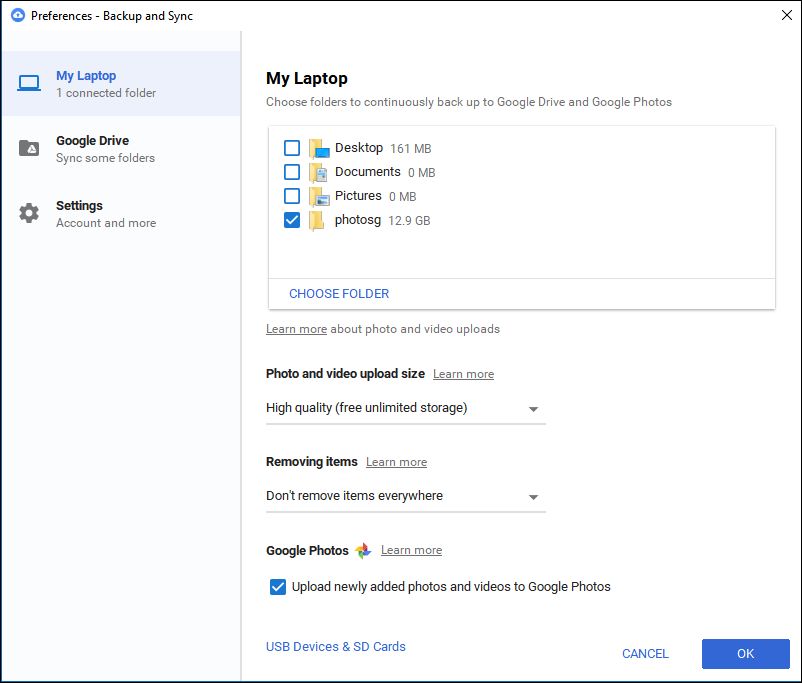
After the restart, open B&S from the tray and select Preferences from the menu which would display the following screen:

Google Backup and Sync: Preferences screen

Set the options for Size and Removing Items as shown above. The setting shown will preserve your photo on the Google Photos website even if you delete it from your hard drive (this was how the old Google Photos app worked). Conversely, this setting does not sync your Drive if you delete a file locally (this behaviour is different from the earlier Drive app; if this option is important for you, please see the comments in this blog post; in short, there is no other way till Google B&S is updated).

Then, select Choose Folder and add the folders that must be synced with Google Photos (which you have noted down). This won't duplicate photos if the folder has already been uploaded by Google Photos. However, B&S would again go through the folder contents and compare it with what's present in the Google Photos site to ensure all is well.

Certain file types may not have been uploaded by Google Photos e.g. TIF, THM. However, B&S uploads files of these types too. Thumbnail related files like thumbs.db and zbthumbnail.info would also be uploaded by B&S. As of now, there is no setting for what files must be synced.

Select the checkbox labeled "Upload newly added photos" if you would like to keep the folders synchronized with the Google Photos site in future.

Popular posts